

|
Getting your Trinity Audio player ready...
|
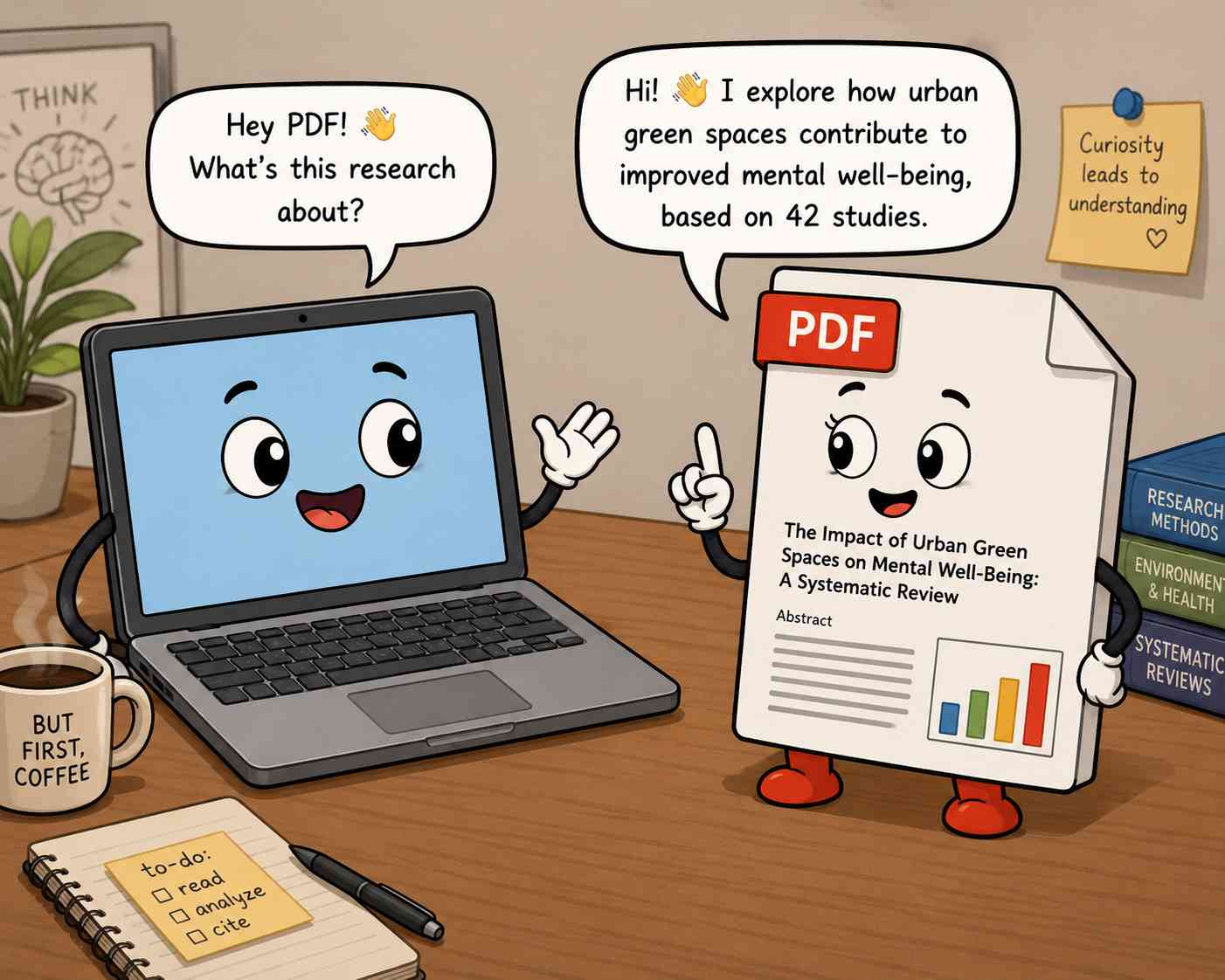
The top 5 AI tools that researchers can use to extract insights and data from PDFs of research papers are Paperpal, R Discovery, Scispace, SmallPDF, and ChatPDF. We’ll look at the key features and capabilities of each chat PDF tool in this article to help you choose the right one.
- Introduction
- How AI PDF Chat Tools Work
- Paperpal: Research-Specialized AI PDF Chat
- R Discovery: Combine Literature Search and Chatting with PDFs
- Scispace: Chat PDF with Multiple Other Features
- ChatPDF: Simple and fast PDF chatting
- SmallPDF: Lightweight, No-Login PDF Chat
- Head-to-Head: Research Paper Use Cases
- AI Tools to Chat with PDF Research Papers: Free vs. Paid Plans
- Tips for Getting the Most Out of AI PDF Chat Tools
Introduction
Academics today face an overwhelming volume of literature. A single literature review can require reading sometimes hundreds of papers.
Even experienced researchers spend hours skimming abstracts, hunting for relevant data buried in appendices, or cross-referencing citations across multiple documents. Time spent searching and extracting is time not spent thinking, writing, or experimenting.
How AI Chat PDF Tools Are Changing Academic Research
AI-powered PDF chat tools are reshaping how researchers interact with documents. Instead of reading a 40-page paper front to back, you can upload it and ask direct questions like
- What is the sample size?
- How do the findings compare to Study X?
- Summarize the limitations.
The AI tool reads, interprets, and responds in seconds, pulling answers grounded in the document itself. For researchers juggling multiple papers simultaneously, this shift from passive reading to active querying is a genuine productivity breakthrough. It means that the researcher can immediately identify whether the paper is actually relevant to their research topic and worth reading or not.
For example, a researcher trying to find articles for a literature review on how calcium intake affects glycated hemoglobin, can directly ask Paperpal or R Discovery whether a certain study has measured and reported HbA1c. And if the study hasn’t, the researcher doesn’t need to bother reading it.
What to Look for in a Research-Focused Chat PDF Tool
Not all PDF chat tools are built for academic use. A general-purpose tool may handle simple Q&A but struggle with technical content, charts, or multi-paper analysis. When evaluating options, prioritize:
- Citation-backed answers: highlighting which specific text the answer was taken from, so that you can verify the claim
- Multi-PDF support: for comparative literature analysis
- OCR capability: to handle scanned documents, especially those from historical archives
- Academic database integration: to discover related papers
The five tools reviewed here address these needs, each with a distinct strength.
How AI PDF Chat Tools Work
The Technology Behind Document Q&A
Most AI PDF chat tools are built on three core technologies working in tandem.
- Large Language Models (LLMs) provide the conversational intelligence: understanding your question and generating a coherent, contextual response.
- Retrieval-Augmented Generation (RAG) is the mechanism that keeps answers grounded in your actual document: rather than relying on the AI’s general training, RAG retrieves the most relevant passages from your PDF before generating a response. This dramatically reduces fabricated answers.
- Optical Character Recognition (OCR) extends these capabilities to scanned documents, converting images of text into machine-readable content so even older journal scans become queryable.
Together, these technologies turn a static document into something you can have a conversation with.
Key Capabilities Relevant to Research Papers
- Multi-PDF analysis allows researchers to upload several papers at once and ask cross-document questions. In this way, they can identify contradictions, patterns, or consensus across a body of literature in minutes rather than days.
- Citation-backed responses link every AI-generated answer to a specific passage in the source document. This is non-negotiable for academic work, where traceability and verification are essential.
- Table and chart interpretation enables the AI to read structured data visually. This helps users extract and compare statistical results.
- Summary generation condenses lengthy papers into digestible overviews, either at the full-document level or section by section, letting researchers figure out whether the paper is relevant and worth reading in full.
Comparison of 5 Top AI Tools to Chat with PDFs of Research Papers
| Feature | Paperpal | R Discovery | SciSpace | ChatPDF | Smallpdf |
| Free Plan Available | ✅ Yes (no ads) | ✅ Yes (7-day unlimited trial) | ✅ Yes (limited queries) | ✅ Yes (2 docs/day) | ✅ Yes (no sign-up needed) |
| Multi-PDF Support | ✅ Up to 10 PDFs | ❌ Single PDF | ✅ Yes (folder-based) | ✅ Yes (via folders) | ✅ Yes (multiple uploads) |
| Citation-Backed Answers | ✅ With source links to exact passages | ✅ Links to relevant document sections | ✅ Yes, section-level citations | ✅ Built-in PDF references | ❌ Not highlighted as a feature |
| Research-Specific Features | ✅ Literature matrix, 250M+ paper database, academic writing tools | ✅ 300M+ paper database, personalized research feed, literature review generator | ✅ 285M+ paper database, literature review, concept finder | ⚠️ General use; limited support for academic papers | ❌ General-purpose tool |
| OCR / Scanned PDF Support | ❌ Not specified | ❌ Not specified | ❌ Not specified | ❌ Not specified | ✅ Yes, explicitly supported |
| No Sign-Up Required | ❌ Account required | ❌ Account required | ❌ Account required | ✅ Core features, no account needed | ✅ No registration needed |
| Academic Database Access | ✅ 250M+ articles | ✅ 300M+ papers, 40M+ open access | ✅ 285M+ papers | ❌ No | ❌ No |
| Export / Notes Feature | ✅ Save to notes with auto-citations | ✅ Saves to library | ✅ Notes with AI writer integration | ❌ Not specified | ❌ Not specified |
| Mobile App | ✅ Yes | ✅ iOS & Android | ❌ Not specified | ❌ Not specified | ✅ Yes |
| Primary Audience | Scientists and researchers | Researchers & students | Researchers & students | Students, researchers, professionals | Researchers in art, history, literature, etc. |
Key takeaway: Tools like Paperpal, R Discovery, and SciSpace are purpose-built for academic research, offering deep database access and citation tracing. ChatPDF prioritizes ease of entry with no sign-up required, while Smallpdf stands out for its OCR support and zero-friction access. This makes it better suited for researchers who work with scanned files from archives (literature, art history, historical linguistics, etc.).
Paperpal: Research-Specialized AI PDF Chat
Overview and Target Audience
Paperpal is a comprehensive AI academic writing assistant built specifically for the scholarly community, trusted by 4M+ academics globally. Unlike general-purpose PDF tools, every feature is designed with the research workflow in mind, from reading and annotating to citing and writing. It is backed by 22+ years of science, technical, and medical expertise, with its AI trained on millions of published scholarly articles. Its primary audience includes PhD students, academic researchers, scientists, and medical professionals who regularly work with dense, citation-heavy literature and need more than a basic document reader.
Key Features for Researchers
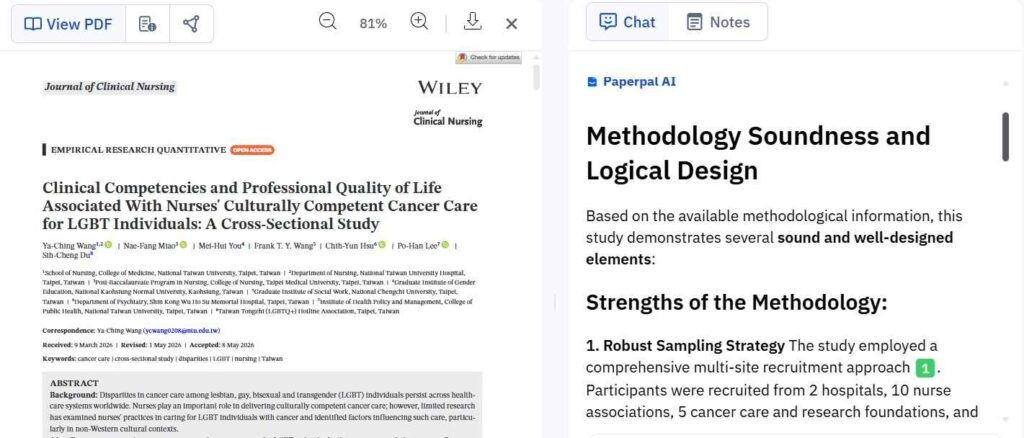
- Multi-PDF analysis: Upload and simultaneously chat with up to 10 PDFs, extracting key insights, comparing findings, and spotting patterns across papers, turning hours of cross-referencing into minutes.
- Citation-backed answers: Every AI-generated response includes source links that trace back to exact passages in the uploaded documents, eliminating hallucinations.
- Auto literature comparison matrices: Generate structured comparison tables across papers and export them for deeper analysis. This is particularly useful when writing a literature review.
- Research database access: Upload papers directly from Paperpal’s repository of 250M+ research articles, or add PDFs mid-conversation without restarting the session.
- Integrated notes with auto-citations: Save insights directly from the chat to a notes panel with auto-generated citations, then move seamlessly into writing with access to Paperpal’s AI writing, paraphrasing, and citation tools.
- Chrome extension: Chat with any PDF found on the web without downloading it first, directly from your browser.
Limitations to Know
- Paperpal is designed primarily for text-based academic content; users working heavily with data-dense spreadsheets or non-academic PDFs may find it less useful.
- No OCR capability, meaning that Paperpal can’t handle scanned historical documents, handwritten content, or archive content.
Best For
Paperpal is the strongest choice for active researchers and graduate students who need a single, integrated environment for reading, analysing, and writing, rather than a standalone document Q&A tool. It is especially valuable for those preparing journal submissions, conducting literature reviews across multiple papers, or working in English as a second language, where its academic-specific language suggestions add measurable value.
R Discovery: Combine Literature Search and Chatting with PDFs
Overview and Target Audience
R Discovery is a literature search and reading platform built around the idea that finding and consuming research should be as effortless as possible. Trusted by over 3.2 million researchers from top universities including Harvard, Cambridge, and Stanford, it sits at the intersection of academic discovery and document comprehension. Where Paperpal centres on writing, R Discovery focuses on the reading and discovery end of the research process, helping users stay current with their field, find relevant papers, and quickly extract meaning from what they find. Its primary audience is researchers, PhD students, and academics who read high volumes of literature regularly and need a smarter way to triage, understand, and organise it.
Key Features for Researchers
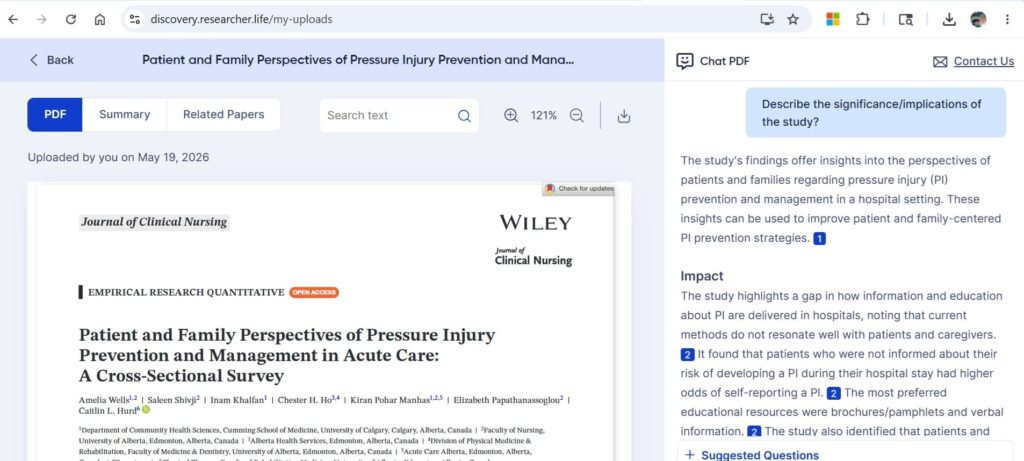
- Chat PDF with source verification: Upload any research paper, thesis, or supplementary material and ask questions about it. Every answer links back to the exact section of the document, making it easy to cross-verify AI-generated responses.
- Massive research database: Access 300M+ research papers, 40M+ open-access full texts, 8M+ research summaries, 3M+ preprints, and content from 32,000+ journals.
- Multilingual paper translation: Read research papers in 30+ languages, removing language barriers for non-native English speakers and making international literature more accessible.
- Literature review generation: Generate a literature review that finds relevant papers and synthesises key insights across your research topic.
- Reference manager integration: Sync your library with Mendeley and Zotero, and save and share collaborative reading lists with co-researchers.
Limitations to Know
- Multi-document comparison is not yet supported; the Chat PDF feature currently works on one PDF at a time.
- PDFs are capped at 100 pages and 20 MB per file. This easily covers journal articles, preprints, patents, etc. but makes the tool slower for full-length books or huge supplementary datasets.
- R Discovery’s Chat PDF is stronger on reading comprehension than on writing integration, which means that users who need to move from analysis into drafting will need a separate tool like Paperpal.
Best For
R Discovery is the strongest fit for researchers in the discovery and reading phase of their work. It is indispensable for those who need to stay on top of a large, fast-moving literature, consume papers efficiently across languages, and organise findings before writing begins. It is particularly well-suited to academics working across multilingual literature or in fields where keeping up with volume is the primary challenge.
Scispace: Chat PDF with Multiple Other Features
Overview and Target Audience
SciSpace is a wide-ranging AI research platform that covers literature discovery, PDF chat, biomedical database searching, laboratory protocol and workflows, etc. However, where Paperpal is purpose-built around academic writing quality and R Discovery excels at literature consumption and discovery, SciSpace occupies a middle ground, attempting to do many things at once. The result is a platform that is versatile but lacks the depth and polish of more specialized tools in several key areas.
Key Features for Researchers
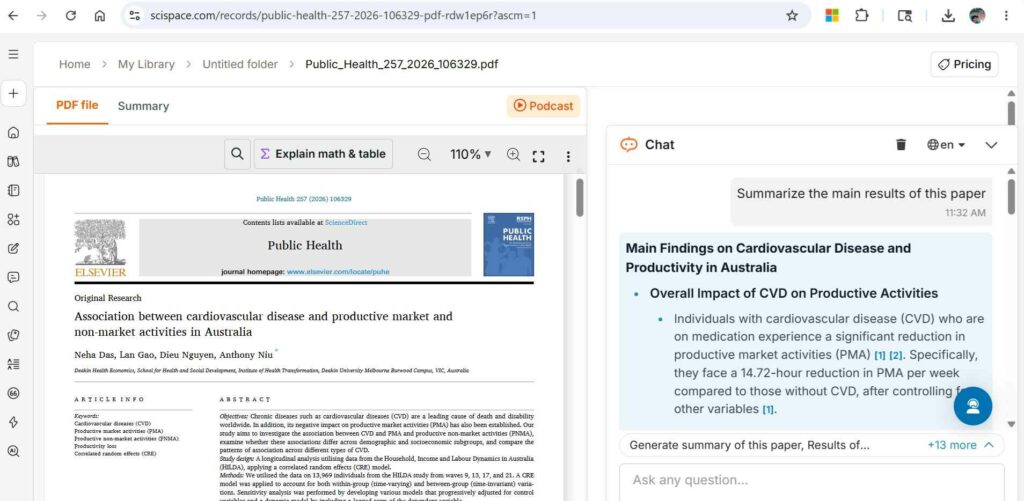
- Chat with PDF: Offers precise, citation-backed answers drawn from specific sections of an uploaded document, with the option to ask follow-up questions or request related research recommendations based on highlighted text.
- Folder-based multi-PDF analysis: Researchers can upload batches of PDFs into folders and ask synthesis-level questions across them, such as identifying common limitations or recurring findings
- Large paper database: Indexes over 280 million papers and 50 million open-access PDFs, enabling natural-language search across disciplines without complex Boolean strings.
- Systematic literature review automation: Can execute structured literature reviews with citation-backed summaries, and a specialised Deep Review mode allows more granular analysis across large sets of papers.
Limitations to Know
- Export to Zotero via CSV or BibTeX is not available on the free plan, limiting its usefulness for researchers managing references across tools without paying first.
- Opaque credit consumption: you cannot predict costs easily before you complete a task, which means that you could end up spending much more than you anticipated.
Best For
SciSpace suits students and researchers who want efficient basic support in both wet lab and literature search tasks. It is a reasonable starting point for those new to AI-assisted research, particularly for basic PDF Q&A to inform experiment-related decisions (e.g., identifying the right reagent or antibody). However, researchers who need reliable, deep academic writing assistance will find Paperpal more rigorous, and those focused on literature discovery and reading at volume will find R Discovery better suited to that workflow.
ChatPDF: Simple and fast PDF chatting
Overview and Target Audience
ChatPDF is where the PDF chat category began for many users. Its a pioneering tool that stripped the concept down to its simplest form. Loved by 10M+ users and answering over 1 million questions daily, it has built its reputation on one thing done well: letting anyone chat with a document instantly, without a steep learning curve or a required account. Unlike Paperpal or R Discovery, which embed PDF chat inside broader academic ecosystems, ChatPDF is a standalone tool with no pretence of being a research platform.
Key Features for Researchers
- Broad format and language support: Accepts PDFs, Word documents, PowerPoint files, and text files, and can converse in any language regardless of the source document’s language.
- No account required for core features: Users can upload and start chatting immediately, making it the lowest-friction option in this list for one-off or occasional paper reading.
- Clickable in-text citations: Every response links back to the source passage within the PDF, allowing users to verify answers without hunting through the document manually.
Limitations to Know
- It can misinterpret highly technical jargon or nuanced arguments in specialised papers, making it unreliable for complex research.
- Responses can turn generic without explicit prompting to cite or quote from the text. Researchers need to engineer their questions carefully to get precise, sourced outputs. Paperpal’s pre-set academic prompts and R Discovery’s research-specific Q&A handle this more elegantly out of the box.
- There is no integration with reference managers, no note-saving with auto-citations, no academic database access, and no writing tools, making it a reading aid rather than part of a research workflow.
Best For
ChatPDF is the right choice for researchers who need quick, occasional answers from a PDF across different contexts, not just academic ones. For sustained, citation-critical research work, it falls short of Paperpal and R Discovery, but as a fast, free starting point, few tools match its accessibility.
SmallPDF: Lightweight, No-Login PDF Chat
Overview and Target Audience
Smallpdf is the oldest and most widely used tool in this roundup: a document management utility that has steadily added AI capabilities. It mainly excels at compression, conversion, and merging PDFs rather than reading or analysing them. The Chat PDF feature functions an addition to that established toolkit, not as a core product. As a result, Smallpdf serves a fundamentally different audience than the research-focused tools above: general users, office professionals, students handling everyday documents, and anyone who needs PDF management and occasional AI Q&A in one place without switching between tools.
Key Features for Researchers
- Upload and chat with PDFs instantly with no account, making it useful for one-off paper queries without any commitment.
- OCR for scanned PDFs: One of the few tools in this roundup to explicitly support scanned and image-based documents, converting non-digital text into searchable content before processing it. This is a genuine advantage when working with older journal scans, historical archives, or handwritten documents (e.g., in ethnographical research).
- Multi-format upload: Accepts PDFs, Word, Excel, PowerPoint, PNG, and JPG files in a single workspace, useful for researchers who work across document types beyond academic PDFs.
Limitations to Know
- Its Q&A capability is more limited than dedicated PDF chat tools, and the free plan restricts users to 2 tasks per day across all Smallpdf tools combined (not just chat), meaning converting a file eats into the same daily allowance.
- There are no citation-backed answers, no source linking to specific passages, no academic database access, no reference manager integration, and no note-saving: all features that are standard in Paperpal and R Discovery.
- It struggles to extract more than simple answers from technical documents, including research papers, financial and legal documents.
Best For
Smallpdf is best suited for researchers who need occasional, basic interaction with scanned documents without setting up an account or installing software.
Head-to-Head: Research Paper Use Cases
Best AI Tools for Different Tasks with PDFs of Research Papers
| Use Case | Best Tool | Runner-Up |
| Summarizing a single paper quickly | R Discovery | Paperpal |
| Cross-referencing 5+ papers | Paperpal | Scispace |
| Getting cited, verifiable answers | Paperpal | R Discovery |
| Analyzing charts and statistical data | Scispace | Paperpal |
| Writing a literature review | Paperpal | Scispace |
| Casual use without sign-up | ChatPDF | SmallPDF |
| Accessing papers from a research database | R Discovery | Scispace |
AI Tools to Chat with PDF Research Papers: Free vs. Paid Plans
| Tool | Free Tier Limits | Paid Plan Starting Price | Notable Paid Features |
| Paperpal | 200 language correction suggestions/month; 5 uses/day of generative AI features; plagiarism scan up to 7,000 words/month | $25/month (or $139/year) | Unlimited language corrections, unrestricted generative AI use, unlimited citation generation, 10,000 words/month plagiarism scanning, full journal submission checks |
| R Discovery | 7-day free trial with unlimited questions and PDF uploads; core reading features available at no cost | $3/month or $25/year | Audio paper streaming, research paper translation, auto-sync with reference managers (Mendeley, Zotero), collaborative reading lists |
| SciSpace | Free Basic plan with daily chat limits, PDF Q&A, and 5 literature review columns; bandwidth caps apply after heavy use | $12/month (billed annually) or $20/month | Unlimited literature searches, full AI writer, high-quality model tier, unlimited paraphraser, notebook entries, and RIS/CSV export |
| ChatPDF | 2 PDFs/day, up to 120 pages and 10 MB per file, 50 questions/day; no account needed for core features | ~$5/month T | Unlimited PDFs, up to 2,000 pages and 32 MB per file, 1,000 questions/day, up to 50 PDFs per folder for multi-document chat |
| Smallpdf | Access to all PDF tools but limited to 2 conversions per day; no customer support access on free tier | $12/month (or $108/year) | Unlimited usage across all tools, batch processing, offline access via desktop app, saved signatures, and team account functionality |
Note: Pricing is subject to change. Always verify current plans on each tool’s official website before subscribing.
Tips for Getting the Most Out of AI PDF Chat Tools
How to Write Better Prompts for Research Papers
Vague questions get vague answers. Instead of asking “What is this paper about?”, try prompts that target specific information:
- Methodology: “What data collection method did the authors use, and what was the sample size?”
- Comparison: “How do the findings in this paper differ from the studies cited in the literature review?”
- Synthesis: “What limitations are common across all 10 uploaded papers?” (Paperpal and SciSpace both support this cross-document querying)
With Paperpal, pre-set prompt suggestions help guide first-time users, while researchers can build on initial answers with follow-up questions in the same session without restarting the conversation.
Verifying AI Responses: Why Citation Tracing Matters
AI tools can occasionally misrepresent or oversimplify findings. Both Paperpal and R Discovery address this by anchoring every response to a specific source passage. Paperpal provides direct source links traceable to exact text within uploaded PDFs. R Discovery similarly links answers to the precise document section they derive from. Always click through. Treat citations as a starting point for verification, not a substitute for reading the original.
Combining PDF Chat Tools with Reference Managers
Paperpal integrates note-saving directly into its workspace, allowing researchers to copy insights with auto-generated citations and carry them seamlessly into the writing phase. This removes the manual step of transferring quotes and references into a separate citation manager, keeping the entire workflow (reading, annotating, and writing) within one environment.
R Discovery too is integrated seamlessly with reference managers like Zotero and Mendeley. If you use R Discovery Prime, you can set up automatic, two-way syncing, meaning any paper you save or delete in R Discovery will instantly update in your Zotero or Mendeley account.


Leave a Reply