

|
Getting your Trinity Audio player ready...
|
The best AI research assistants in 2026 that we tested on actual research tasks are
1. Paperpal: To combine academic research and writing
2. R Discovery: For faster and more accessible literature searches
3. Elicit: To speed up systematic reviews
4. Consensus: To get evidence-backed answers in clinical care
5. Notebook LM: to synthesize your own documents and notes
6. Scite.ai: To recheck references
7. Semantic Scholar: to track down influential papers
Jump to Contents
What to Look for in an AI Research Assistant
7 Best AI Research Assistants at a Glance
Comparing the features of 7 AI research assistants
What to Look for in an AI Research Assistant
- Citation Accuracy and Hallucination Rate: Academics cannot afford to have fabricated or hallucinated data (frequently produced by ChatGPT and other all-purpose AI tools) in their research.
- Source Database Size and Quality: The scientific corpus is vast. A research assistant that focuses on just one database (e.g., Scopus) is not much use as it will miss many other valuable papers.
- Synthesis Depth vs. Speed: While some tools can generate strings of papers in seconds, the tools we have listed here, like R Discovery and Elicit, produce carefully chosen and thoughtfully curated syntheses of high-quality research papers, and yet don’t take an unreasonable amount of time.
- Document Upload and Analysis Capabilities: Researchers get papers from colleagues, peers, networking contacts, etc., and not just online searches. It’s important to have an AI research assistant that can handle user-uploaded content as well as web-sourced content.
- Pricing and Free Tier Access: Research budgets are tight. Researchers prefer AI research assistants with a generous free tier so that they can test out whether that tool works well with their subject area and specific projects, before committing to a purchase.
7 Best AI Research Assistants at a Glance
Table: A Quick Comparison of the 7 Best AI Research Assistants
| Tool | Best For | Hallucination Risk | Free Plan | Starting Price (USD/month) |
| Paperpal | Academic writing & editing | Low | Yes | 11.50 |
| R Discovery | Literature discovery & tracking | Low | Yes | 9 |
| Elicit | Structured data extraction from papers | Low | Yes (limited) | 10 |
| Consensus | Quick evidence-grounded answers | Low–Medium | Yes (limited) | 8.99 |
| NotebookLM | Deep analysis of uploaded documents | Very low | Yes | Free |
| Scite.ai | Citation verification & context | Medium | No (7 day free trial) | 20 |
| Semantic Scholar | Free academic paper discovery | Medium | Yes | Free |
We’ll now look at each AI research assistant in more detail.
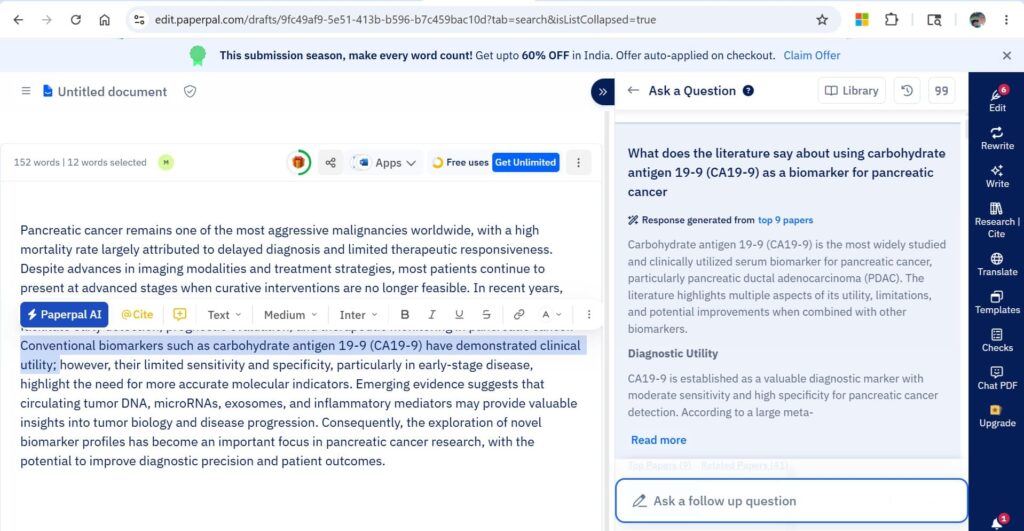
1. Paperpal: To combine academic research and writing
Key Features
- AI Reference Finder: searches 250M+ research articles, books, conference papers, patents, and preprints to find credible sources in minutes
- Factual, Science-Backed Answers: generates 100% factual responses validated by verified full-text scientific articles, answered in plain English
- Citations Library: bookmark and organize relevant references for convenient use across essays and papers
- Citation Generator: cite sources accurately in 10,000+ styles
- AI Writing Tool: turns ideas into clear, submission-ready drafts with context-aware suggestions
- Chat with PDFs: upload up to 10 PDFs for instant summaries, answers, and analysis in any language
- Grammar Checker: academic-focused grammar and language polishing
- AI Paraphraser: improves vocabulary, achieves academic tone, and trims text
- AI Detector: ensures authentic, human-written content
- Online Translator: translates academic content across 50+ language pairs
- Submission Checks: 30+ language and technical checks for journal manuscript readiness
- Platform Availability: works on MS Word, Google Docs, Chrome, Web, and Overleaf
Pricing
| Feature | Free | Prime (from $11.50/mo) |
| Language edits | 200/month | Unlimited + Consistency checks |
| AI writing tools (Rewrite, Predictive writing, Translate, AI Review) | 5 uses/day | Unlimited |
| Research Q&A | 5 uses/day | Unlimited |
| Citation generation | Unlimited | Unlimited |
| AI detection | 5 scans/day (1,200 words/scan) | Unlimited (10,000 words/scan) |
| Chat with PDFs | 5 uploads/month | 250 uploads/month |
| Plagiarism checks | 7,000 words/month (standard report) | 10,000 words/month (detailed report) |
| Journal submission checks | Summary report | Detailed report + Edited file |
Multi-year and Teams plans available at further discounts.
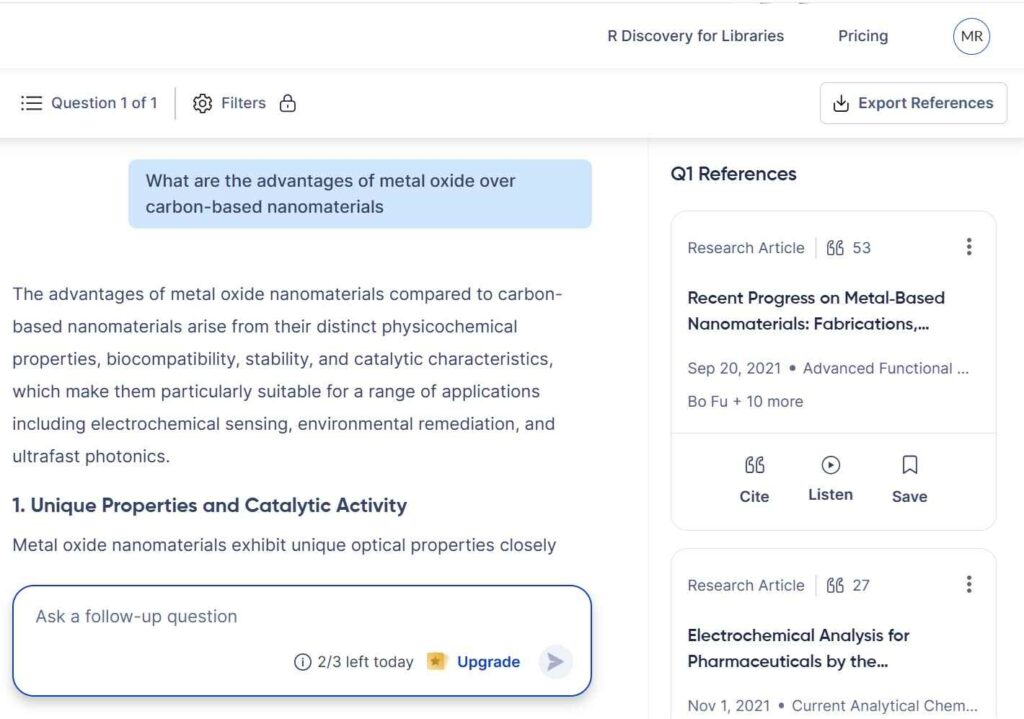
2. R Discovery: For faster and more accessible literature searches
Key Features
- AI-Powered Research Assistant: Ask any research question and get AI-generated answers backed by citations from 300M+ verified sources, along with smart summaries and highlights to help you understand complex research faster.
- Chat PDF: Upload any PDF paper or interact with an existing one to ask targeted questions and receive AI-driven answers, making it easier to extract insights from individual documents.
- Personalized Research Feed: R Discovery’s AI learns from your reading history and preferences to deliver a tailored feed of top papers, with 5,000+ new papers added daily across journals, preprints, and conference documents.
- Multilingual & Audio Access: Break language barriers by reading papers in 30+ languages, or listen to them in human-like voices: making research accessible on the go and across language backgrounds.
- Massive, Curated Database: Access content from 150M+ journal articles, 43M+ open access papers, 7.5M+ patents, and 5M+ preprints, sourced from top aggregators like PubMed, CrossRef, and leading publishers such as Wiley, Springer Nature, and NEJM: all cleaned to remove duplicates and predatory content.
Pricing
| Feature | Free | Prime ($5/month, billed yearly) |
| AI Assistant | 3 uses/day | Unlimited |
| Chat PDF | 3 uses/day, 5 file uploads/month | Unlimited |
| Literature Review | — | Unlimited |
| Literature Maps | — | Unrestricted |
| Audio Papers & Translation | Limited | Unlimited |
| Content Feeds | — | Full access (multiple projects) |
| Research Shorts | Standard | Personalized (App only) |
| Collaboration on Reading Lists | — | Unlimited collaborators |
| Auto-sync to Zotero/Mendeley | — | ✓ |
| Multiple Projects | — | ✓ |
| Exports | — | Unlimited (all features) |
| Prime Support | — | Exclusive 1-to-1 support |
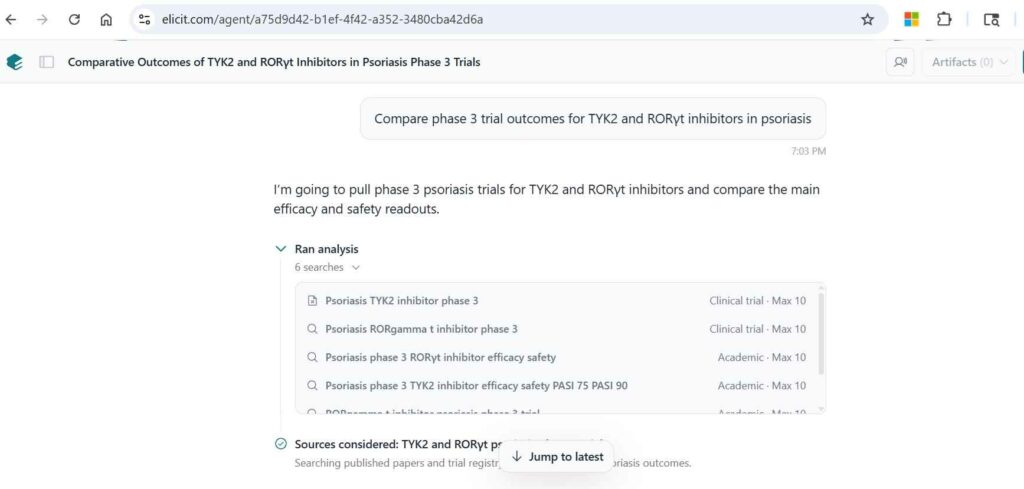
3. Elicit: To speed up systematic reviews
Key Features
- Comprehensive Paper Screening: Screen up to 40,000 papers in real-time with AI-autosuggested criteria and recommendations. Every decision is PRISMA-auditable with exclusion reasons, per-criterion scores, and supporting quotes, with the option for dual review pairing humans with AI.
- Accurate Data Extraction: Elicit extracts both quantitative and qualitative data: including from tables and figures: with every extraction supported by quotes or figures from the source. Users can work from AI-suggested templates or build their own.
- Multi-Source Literature Search: Gather sources across PubMed, ClinicalTrials.gov, and Elicit’s corpus of 138M+ papers, or import from other databases. Supports both reproducible keyword searches and semantic search to minimize missed relevant papers.
- Evidence Synthesis & Reporting: Generate reports synthesizing up to 200 papers, with each claim backed by sentence-level citations. All reports include a methods section with PRISMA flow diagrams, paper summary tables, and search strategies, using built-in or custom templates.
- Living Reviews & Transparency: Combine systematic reviews with alerts to keep reviews continuously updated as new research emerges. Completed reviews can be shared via a public link: including all intermediate steps and results: with anyone, even without an Elicit account.
Pricing
| Feature | Basic (Free) | Pro ($49/month) | Scale ($169/month) |
| Research Agent | Limited access | Extended access | Full access |
| Automated Reports | 2/month | 144/year | 240/year |
| Paper Search | Unlimited (138M+ papers) | Unlimited (138M+ papers) | Unlimited (138M+ papers) |
| Paper Summaries | Unlimited | Unlimited | Unlimited |
| Chat with Papers | Unlimited | Unlimited | Unlimited |
| Table Columns | 2 at a time | 20 at a time | 30 at a time |
| Data Sources per Report | — | Up to 135 | Up to 200 |
| Paper Screening | — | Up to 5,000 papers | Up to 5,000 papers |
| Research Alerts | — | 10 personalized | 10 personalized |
| Custom Extractions (uploads) | — | ✓ | ✓ |
| AI Answer Explanations | — | ✓ | ✓ |
| Multiple Output Templates | — | ✓ | ✓ |
| API Access | — | ✓ | ✓ |
| Figure Extraction & Interpretation | — | — | ✓ |
| Real-Time Collaboration | — | — | ✓ |
| Admin Panel & Usage Tracking | — | — | ✓ |
| Import from Zotero | ✓ | ✓ | ✓ |
| View Sources for Answers | ✓ | ✓ | ✓ |
4. Consensus: To get evidence-backed answers in clinical care
Key Features
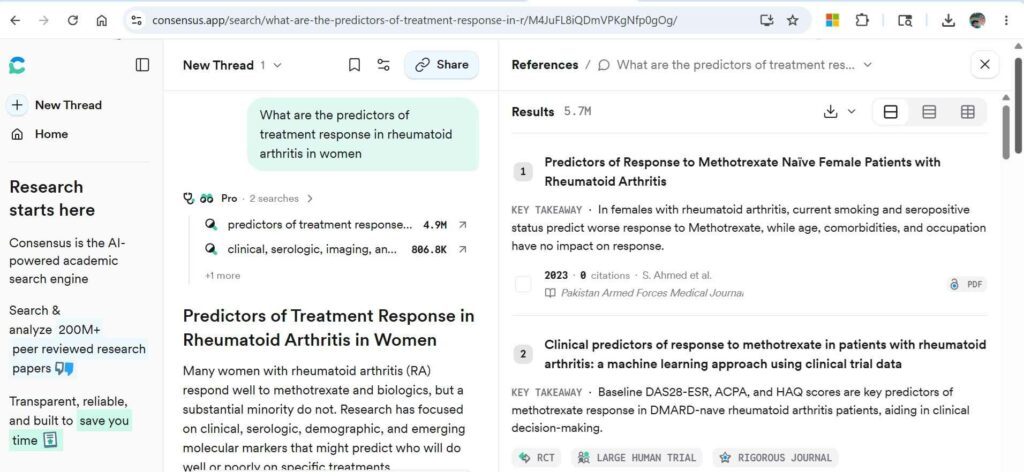
- Deep Search & Smart Filtering: Consensus transforms lengthy literature reviews into a matter of minutes using Deep Search, which builds comprehensive search strategies by expanding key terms, identifying conflicting arguments, and exploring citation graphs. Users can apply filters naturally within their prompt: specifying timeframes, populations, study designs, and more: with Consensus automatically interpreting and applying them.
- Medical Mode: A specialized mode that narrows results to approximately 50,000 clinical guidelines and 8M articles from the top 1,000 medical journals, designed for fast and trusted clinical answers.
- Consensus Meter: A flagship yes-or-no visualization that instantly shows how much the research agrees or disagrees on a given question, with papers and citations color-coded by stance for a quick, visual read on the state of evidence.
- Pro Search with Rich Visualizations: Powered by OpenAI’s LLMs and grounded in peer-reviewed research, Pro messages deliver helpful summaries alongside advanced visualizations including a Claims & Evidence Table, Research Gaps Heat Map, Results Timeline, and TL;DR header, giving users multiple ways to interpret and navigate findings.
- Transparent Citations & Export: Every claim is backed by inline citations linking directly to source papers, with indicators showing whether the full text or abstract was used in the analysis. Results can be exported in CSV, RIS, or multiple bibliography formats including APA, MLA, Chicago, Harvard, BibTeX, and AMA.
Pricing
| Feature | Free ($0/mo) | Pro ($10/mo) | Deep ($45/mo) |
| Billing | Free | $120/year (save $60) | $540/year (save $240) |
| Basic Paper Search | ✓ | ✓ | ✓ |
| Pro Messages | 15/month | Unlimited | Unlimited |
| Deep Reviews | 3/month | 15/month | 200/month |
| Access to All Research Tools | — | ✓ | ✓ |
| Citation Graph | — | ✓ | ✓ |
| AI-Powered Search & Analysis | — | ✓ | ✓ |
| Discount Eligibility | — | Up to 40% off (students, faculty, US HCPs) | Up to 40% off (students, faculty, US HCPs) |
5. Notebook LM: to synthesize your own documents and notes
Key Features
- Source-Grounded AI with Verified Citations: NotebookLM reads the documents you upload: PDFs, notes, slides, links, and transcripts: and gives answers grounded in those sources, with citations you can verify, eliminating the risk of hallucinated or fabricated references common in general AI tools.
- Deep Research & Literature Synthesis: The Deep Research feature operates as an autonomous agent that breaks complex queries into sub-questions, executes parallel searches across the web and the user’s private corpus, and synthesizes findings while identifying gaps: effectively performing a literature review in minutes.
- Data Tables for Structured Extraction: The Data Tables feature automatically synthesizes sources into structured tables. Researchers can drop hundreds of research articles into a notebook and generate a table breaking down each article’s methodology, sample size, key findings, and conclusions: work that would previously take days of reading and manually compiling notes.
- Multi-Format Output (Audio, Mind Maps, Summaries): NotebookLM offers several distinct formats for extracting information, including a podcast-style audio overview where two people discuss your research, making it easier to understand complex topics through various angles. Mind maps and video overviews are also available, helping researchers visualize connections across multiple sources.
- Broad Source Compatibility & Privacy: NotebookLM supports PDFs, Google Docs, Word docs, text files, websites, and YouTube videos, with up to 50 sources per notebook on the free plan and 300 on Plus. Importantly, data is not used to train models and remains within the user’s trust boundary. This is a key consideration for researchers handling sensitive or unpublished work.
Pricing
Notebook LM is a free tool with no paid version.
6. Scite.ai: To recheck references
Key Features
- Smart Citations: Scite.ai goes beyond traditional citation counts by classifying citations as supporting, mentioning, or contrasting, giving researchers a nuanced view of how a paper has been received by the scientific community rather than simply how many times it has been cited.
- Manuscript & Reference Reliability Check: Researchers can upload a manuscript, grant, preprint, or published paper to generate a report that flags whether any of its references have been retracted, are highly contested by other studies, or are generally well supported: helping ensure the credibility of cited sources before publication.
- Saved Searches & Alerts: Scite.ai allows users to set up saved searches with email alerts, keeping researchers automatically updated on new citations and publications related to their topics of interest without needing to manually re-run searches.
- Scite MCP Integration: Scite’s Model Context Protocol (MCP) server connects its Smart Citations and full-text scientific literature directly into AI tools such as ChatGPT, Claude, and Gemini, allowing researchers to verify references and access real scientific sources from within the AI tools they already use.
- Institutional & Journal-Level Intelligence: Scite.ai provides Unweighted Scite Index (USI) scores for funding institutions, organizations, and journals, showing how their associated publications have been supported, mentioned, or contrasted: offering a data-driven way to evaluate the research impact and reliability of institutions and publications.
Pricing
| Feature | Basic | Pro |
| Price | $20 / month | $50 / month |
| Best for | Individual use | Power researchers |
| Free trial | 7 days | 7 days |
| Scite Assistant | ✓ | ✓ |
| Full-text search | ✓ | ✓ |
| Custom dashboards | ✓ | ✓ |
| Paper citation reports | ✓ | ✓ |
| Citation alerts | ✓ | ✓ |
| MCP credits / month | 250 | 2,500 |
| Patents in search and Assistant | — | ✓ |
| MCP access to patents, grants, clinical trials, and more | — | ✓ |
7. Semantic Scholar: to track down influential papers
Key Features
- AI-Powered Search & TL;DR Summaries: Semantic Scholar uses a combination of machine learning, natural language processing, and machine vision to add a layer of semantic analysis to traditional citation methods, and automatically generates short TL;DR summaries for papers, allowing researchers to quickly assess relevance without reading full abstracts.
- Semantic Reader: Semantic Reader is an augmented reading experience that provides inline citation cards with auto-generated TL;DR summaries as users read, along with skimming highlights that capture key points of a paper so users can digest content faster.
- Personalized Research Feeds: Research Feeds is an adaptive recommender that uses AI to quickly learn what papers users care about and recommends the latest research, helping researchers stay current in their field without manually scanning new publications.
- Citation Alerts & Paper Tracking: Researchers can create alerts for topics, authors, or specific papers to catch new citations, which is particularly useful for ongoing projects and keeping a literature review current. Strong linkage to arXiv, PubMed, and institutional repositories also makes it easier to access free versions of papers.
- Free Access & Open API: Semantic Scholar indexes 214M+ papers and provides a free, robust API, making it accessible to researchers worldwide: including those without institutional subscriptions: and enabling technical users to build custom workflows and perform large-scale literature analyses.
Pricing
Semantic Scholar is completely free to us.
How to Choose the Right AI Research Assistant for Your Needs
Here’s a quick guide to choosing the right research assistant for your needs:
| Research Need | Best Tool |
| Researcher working on a journal article | Paperpal |
| ESL researcher finding literature searches difficult | R Discovery |
| Writing a systematic review | Elicit |
| Clinician looking for evidence-backed answers to inform patient care | Consensus |
| Researcher with a large existing collection of papers (e.g., an offline archive) | NotebookLM |
Comparing the features of 7 AI research assistants
| Feature | Paperpal | R Discovery | Elicit | Consensus | NotebookLM | Scite.ai | Semantic Scholar |
| Peer-reviewed sources only | Yes | Yes | Yes | Yes | No (user uploads) | Yes | Yes |
| Document upload feature | Yes | Yes | Yes | No | Yes | Yes | No |
| Synthesis capability | Medium (writing focus) | Medium (summary-based) | Medium (table extraction) | Low (answer snippets) | Medium (document-scoped) | Low (citation context) | None |
| Citation network mapping | No | Yes (discovery graphs) | No | No | No | Yes (supporting/contrasting) | Yes (co-citation network) |
| Starting price | ~$12/mo | ~$9/mo | ~$10/mo | ~$8.99/mo | Free | ~$10/mo | Free |
Frequently Asked Questions
Are AI research assistants reliable for academic work?
Yes, Paperpal, R Discovery, Elicit, Consensus, Semantic Scholar, and Scite.ai have consistently produced reliable, accurate citations from genuine published research. Notebook LM’s output is completely dependent on the quality of what you input: if you input unreliable sources, you will get inaccurate output from Notebook LM.
Do AI research tools access paywalled papers?
R Discovery, Elicit, and Scite.ai allow you to access paywalled papers if you link your account to your university/institute. That way, you get access to paywalled research that your university has subscribed for. These tools don’t let you access paywalled research that you don’t have a subscription for, because that could be considered piracy.
Is it academically ethical to use AI research assistants?
Most universities and journals allow you to use AI research assistants if you
- clearly document and disclose what exactly you used AI for,
- verify any AI output before adding it to your thesis or research paper, and
- take complete responsibility for the contents of your thesis/article.
You need to be in charge of all decision making. If you don’t understand an AI output, don’t add it to your paper.
Which AI research assistant is best for students?
The AI research assistants that are best for students are
- Paperpal as it combines research and writing assistance (so you don’t need separate writing support)
- Notebook LM, if you have already assembled a solid corpus of papers and just need help organizing them
- Semantic Scholar if you are on a tight budget and need just a basic literature search
- R Discovery if English isn’t your first language or you prefer audio-based learning
Can I use AI research assistants offline?
All AI research assistants use AI and so are not available offline. You can review their output offline if you save it on your system, but you won’t be able to use the actual tool.