
|
Getting your Trinity Audio player ready...
|
The top 5 QuillBot alternatives for paraphrasing, especially for students and researchers, are
- Paperpal for theses, dissertations, journal articles, and technical reports
- editGPT for ChatGPT-generated content
- WordTune for social media posts and emails by ESL users
- SpinBot for fast, high-volume paraphrasing of non-scientific content
- Paraphraser.io for multilingual paraphrasing of general-purpose content
QuillBot has long been a go-to paraphrasing tool, but its 125-word free-tier cap, paywalled modes, and occasional meaning-distortion issues have pushed many students and researchers to look elsewhere. Whether you’re rewording a literature review, polishing a dissertation chapter, or summarising sources for a research paper, the right tool can make a significant difference.
This article breaks down the top 5 QuillBot alternatives worth switching to in 2025, ranked by their value for academic and research use.
At a Glance: Quick Comparison Table
| Tool | Best For | Free Plan Limit | Academic Features | Starting Paid Price |
| Paperpal | Journal articles, theses, dissertations | 5 uses/day | ✅ Yes, built for academia | ~$11.50/month |
| editGPT | In-browser proofreading & rewriting | Unlimited (browser extension) | ✅ Moderate | Free (paid for heavy use) |
| WordTune | Sentence-level rewriting, ESL writers | 10 rewrites/day | ⚠️ Partial | $9.99/month |
| Spinbot | Quick bulk paraphrasing | Unlimited (with CAPTCHA) | ❌ Minimal | Free / ~$10/month |
| Paraphraser.io | Budget-conscious students | 600 words/session | ⚠️ Moderate | ~$7/month |
| Paraphrase Online | Simple, fast rewording | Unlimited sessions | ❌ Minimal | Free |
#1 Paperpal: Best QuillBot Alternative for Academic Writing
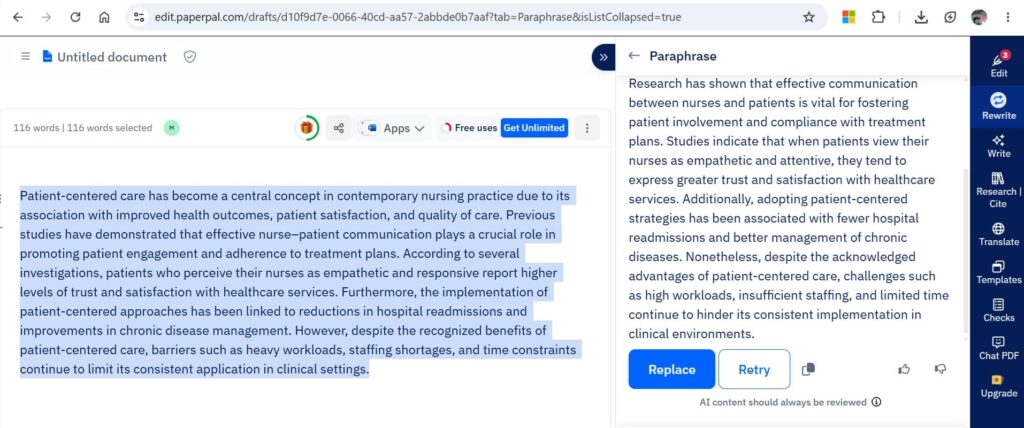
What Is Paperpal?
Paperpal is an AI writing assistant built exclusively for academic and research writing. Unlike general-purpose paraphrasers, it is trained on decades of peer-reviewed, published research across science, technology, and medicine (STM). This means it understands technical language, discipline-specific conventions, and scholarly tone, something most paraphrasers simply cannot replicate.
Why Students and Researchers Prefer Paperpal
- Preserves technical terminology: Does not randomly swap domain-specific words with generic synonyms, a common failure in tools like QuillBot and Spinbot
- Academic tone alignment: Rewrites are calibrated to sound journal-ready, not just grammatically correct
- Integrated citation support: Works with 10,000+ citation styles, including APA, MLA, Chicago, and Vancouver
- Overleaf integration: The only major paraphrasing tool with a native Overleaf plugin, making it indispensable for LaTeX users
- Plagiarism checker included: Free plan includes 7,000 words/month of plagiarism scanning
Paperpal’s Paraphrasing Modes
| Mode | Use Case |
| Professional | Formal academic writing, journal submissions |
| Persuasive | Grant applications, research proposals |
| Conversational | Conference abstracts, blog-style science communication |
| Polite | Emails to supervisors, peer review responses |
| Creative | Opinion pieces, public-facing research summaries |
Paperpal Free vs Paid
| Feature | Free Plan | Prime (Paid) |
| Paraphrasing uses/day | 5 | Unlimited |
| Word cap per use | 150 words per use | No hard cap |
| Plagiarism checker | 7,000 words/month | Extended |
| Grammar/language editing | 200 rounds/month | Unlimited |
| Citation styles | 10,000+ | 10,000+ |
| Overleaf / Word / Google Docs | ✅ | ✅ |
| Journal submission checks | Limited | 30+ checks |
Who Should Use Paperpal?
- ✅ PhD students writing dissertations or thesis chapters
- ✅ Researchers preparing manuscripts for journal submission
- ✅ Non-native English speakers writing in academic English
- ✅ Anyone using LaTeX / Overleaf
- ✅ Writers who need paraphrasing + plagiarism check in one tool
#2 editGPT: Best for In-Context Editing and Rewriting
What Is editGPT?
editGPT is a browser extension that works directly inside ChatGPT’s interface, allowing you to track edits, paraphrase sentences, and proofread text with change-tracking similar to Microsoft Word’s “Track Changes” feature. It also works as a standalone web tool.
Why It Stands Out
- Track Changes functionality: Every edit is highlighted so you can accept or reject individual changes, giving you full control over your final output
- Works inside ChatGPT: You can use GPT-4 as the engine and editGPT as the editor, combining powerful AI generation with structured editing
- No word-count anxiety: The extension-based model means you are not counting characters or refreshing a timer
- Proofreading + paraphrasing in one pass: Catches grammar errors introduced during rewriting, a gap QuillBot frequently leaves unaddressed
editGPT Key Features
| Feature | Details |
| Platform | Browser extension (Chrome) + web app |
| Track Changes | ✅ Yes: accepts/rejects individual edits |
| Paraphrasing modes | Depends on prompts used within ChatGPT |
| Grammar correction | ✅ Built-in |
| Plagiarism checker | ❌ Not included |
| Free plan | ✅ Generous free tier |
| Academic-specific training | ❌ General purpose |
editGPT Limitations for Researchers
- No dedicated academic or formal mode
- Relies on ChatGPT access: a paid ChatGPT plan unlocks GPT-4 level quality
- No native citation support or plagiarism detection
- Not ideal for highly technical scientific content
Who Should Use editGPT?
- ✅ Students who already use ChatGPT and want structured editing on top
- ✅ Writers who need change-tracking to review what was altered
- ✅ Researchers editing acknowledgements, cover letters, or job applications
- ⚠️ Not ideal for manuscript-level scientific paraphrasing
#3 WordTune: Best for Sentence-Level Rewriting and Tone Control
What Is WordTune?
WordTune is an AI writing companion focused on sentence-by-sentence rewriting. It offers tone controls (formal/casual) and length controls (shorten/expand), making it particularly strong for ESL (English as a Second Language) students and researchers who want their writing to sound more natural and fluent.
Why Students Like WordTune
- Native-sounding rewrites: Designed to help non-native English speakers write with greater fluency and idiomatic accuracy
- Formal/Casual tone toggle: Allows switching between registers, useful when writing both academic papers and emails to professors
- Shorten and Expand options: Easily condenses verbose sentences or expands underdeveloped points
- Google Docs and Word integration: Works directly inside document editors, removing the need to copy-paste
WordTune Paraphrasing Modes
| Mode | What It Does |
| Formal | Shifts tone toward professional, academic register |
| Casual | Makes writing more conversational and accessible |
| Shorten | Trims wordiness while preserving meaning |
| Expand | Adds depth and elaboration to brief sentences |
WordTune Free vs Paid
| Feature | Free Plan | Plus (Paid) |
| Rewrites per day | 10 | Unlimited |
| Tone/length modes | ✅ Included | ✅ Included |
| Summaries | 3/month | More |
| Grammar correction | ✅ Unlimited | ✅ Unlimited |
| Plagiarism check | ❌ | ❌ |
| Platform | Web, Chrome extension, Word, Docs | Same + more |
WordTune vs QuillBot: Key Difference
QuillBot allows unlimited rewrites of up to 125 words. WordTune caps free users at 10 rewrites per day with 250 characters per rewrite. For researchers rewriting one sentence at a time, WordTune’s approach is often more practical.
Who Should Use WordTune?
- ✅ ESL students and international researchers writing in English
- ✅ Writers who work sentence-by-sentence rather than paragraph-by-paragraph
- ✅ Anyone who wants formal/casual tone switching built in
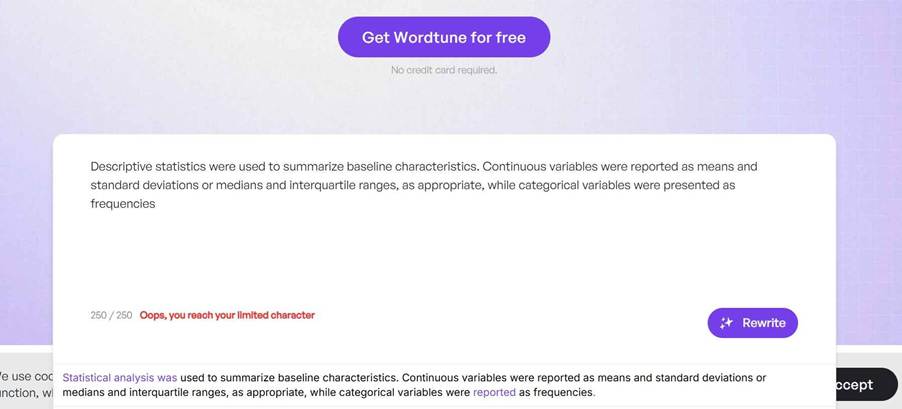
- ⚠️ Not recommended for technical content. In the example below, WordTune changed “descriptive statistics” to “statistical analysis”, altering a commonly used statistical term and replacing it with one that made no sense in the context.
#4 Spinbot: Best for Fast, High-Volume Paraphrasing
What Is Spinbot?
Spinbot is one of the oldest and most straightforward article-spinning tools available. It aggressively rewrites text by substituting words and restructuring sentences at speed, making it popular among students who need to quickly process large volumes of text. It requires no account to use.
Key Features at a Glance
| Feature | Details |
| Word limit (free) | Generous: handles long passages |
| Account required | ❌ No |
| Paraphrasing modes | Basic (standard spin) |
| Grammar check | ❌ Not included |
| Plagiarism check | ❌ Not included |
| Language support | Primarily English |
| Ads | ✅ Yes (free tier) |
| Academic suitability | ⚠️ Low: risky for technical content |
Honest Limitations for Academic Use
Spinbot is best understood as a text spinner, not a true AI paraphraser. Researchers should be aware of the following:
- Meaning distortion risk: Technical and statistical language is frequently mangled; a phrase like “statistically significant reduction” may become something grammatically broken or semantically wrong
- No academic mode: There is no way to tell the tool to preserve scientific terminology
- Output needs heavy editing: Spinbot-generated text almost always requires manual revision before it can appear in any academic document
- Plagiarism check still recommended: The output may still trigger plagiarism detectors despite being heavily reworded
When Spinbot Can Be Useful
- Quickly generating a rough draft alternative phrasing to inspire your own rewrite
- Processing non-technical, general-audience content (blog posts, press releases)
- Budget-constrained users who will review and revise the output manually
Who Should Use Spinbot?
- ✅ Students working on non-technical assignments who plan to manually refine the output
- ✅ Writers needing bulk paraphrasing of general-interest content
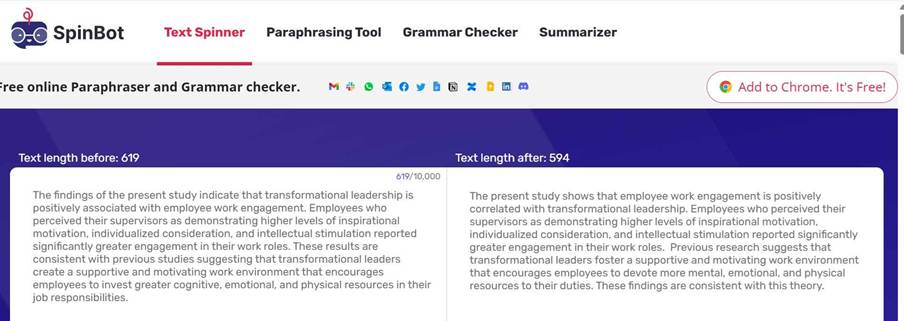
- ❌ Not recommended for scientific manuscripts, theses, or any content with precise technical language. In the example below, Spinbot “left” the technical terms in but as a result, made barely any changes to the text. Also, changing “associated” to “correlated” gives the wrong idea about the kind of analysis done in the study as the two terms are not replacements for each other in academic writing.
#5 Paraphraser.io: Best Budget Alternative with Multi-Language Support
What Is Paraphraser.io?
Paraphraser.io is an AI-powered paraphrasing tool that uses Natural Language Processing to rephrase text while attempting to preserve original meaning. It analyses sentence structure and context rather than simply substituting synonyms, which puts it a step above basic spinners. It supports 20+ languages: a significant advantage for non-English researchers.
Why It’s a Strong Budget Pick
- 600 words per session on the free plan: More than 4× QuillBot’s 125-word free limit
- No daily session cap: Useful for working through longer documents in multiple passes
- Keyword freeze feature: Lets you lock specific terms (e.g., gene names, drug names, technical jargon) so they are not altered during paraphrasing
- Built-in plagiarism checker: Available even on the free tier (limited)
- 20+ language support: Especially valuable for researchers writing in Spanish, French, German, Arabic, or other languages
Paraphraser.io Modes
| Mode | Best For |
| Standard | General professional content |
| Fluency | Smoothing awkward sentence structure |
| Formal | Academic papers and reports |
| Simple | Making complex text more readable |
| Creative | Fiction writing, social media |
Paraphraser.io Free vs Paid
| Feature | Free Plan | Individual (Paid) |
| Words per session | 600 | Higher |
| Daily limit | No cap | No cap |
| Paraphrasing modes | Core modes | All 10+ modes |
| Plagiarism checker | ✅ Limited | ✅ Extended |
| Grammar checker | ✅ Basic | ✅ Full |
| Language support | 20+ | 20+ |
| Ads | ✅ Yes | ❌ No |
Paraphraser.io Limitations
- Output quality on highly technical content (medical, legal, engineering) is inconsistent
- The plagiarism checker is a bonus but not as comprehensive as dedicated tools
- Paid plan pricing (~$7/month) is competitive but the free tier already covers most casual use cases
Who Should Use Paraphraser.io?
- ✅ Students on a tight budget who need more than 125 words per paraphrase
- ✅ Researchers working in languages other than English
- ✅ Anyone who wants keyword protection for technical terms
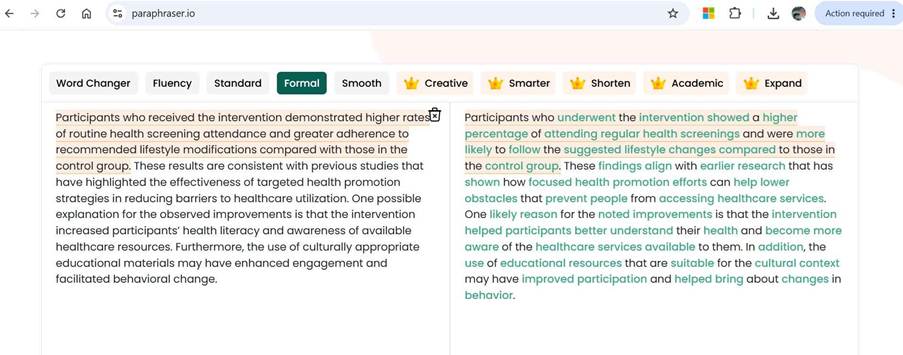
- ⚠️ Review output carefully before using in academic manuscripts. In the example below, the tool’s output “showed a higher percentage of attending regular health screenings” is awkwardly phrased. Also “health literacy” was transformed to “helped participants better understand their health”, which takes away a lot from the actual meaning of “health literacy.”
Bonus: Paraphrase Online: Simplest Free Option
Paraphrase Online is included here as an honourable mention for students who need the most frictionless, no-account, no-cost option. It offers multiple modes including a dedicated Academic mode, highlights changed words so you can spot every edit, and requires no sign-up.
However, it performs poorly on technical or scientific content and its output frequently requires heavy manual correction. Use it only for general-audience text, and always review the output before submitting any work.
How to Choose a Paraphrasing Tool: Decision Guide for Students and Researchers
| Your Situation | Recommended Tool |
| Writing a journal article or dissertation | Paperpal |
| Need to paraphrase ChatGPT output | editGPT |
| Non-native English speaker trying to sound fluent in daily communication | WordTune |
| Need bulk paraphrasing of non-technical content | Spinbot |
| Budget-conscious, need multi-language support | Paraphraser.io |
| Want the simplest possible free tool for non-technical content | Paraphrase Online |
5 Tips for Getting Better Paraphrasing Results (Any Tool)
- Break text into focused chunks: Feed one idea or argument at a time rather than entire paragraphs. This reduces structural distortion and keeps the logic intact.
- Lock your technical terms: Tools like Paraphraser.io allow keyword freezing. In tools that don’t, manually restore altered technical terms after paraphrasing (note that this is rarely ever required in Paperpal, which is why it’s our top recommendation).
- Always compare modes: Most tools offer 3–5 modes on free plans. Run the same passage through two modes and choose the better output rather than accepting the first result.
- Never skip the manual review: AI paraphrasers can change meaning subtly. Read the output sentence by sentence and check it against the original source.
- Run a plagiarism check after paraphrasing: Paraphrasing does not guarantee originality. Use the built-in checker in Paperpal or Paraphraser.io, or a dedicated tool, before submission.
Frequently Asked Questions
Can plagiarism checkers detect AI-paraphrased content?
Yes. Tools like Turnitin analyse writing patterns and structural similarities, not just identical phrases. Heavily AI-paraphrased text can still be flagged if it too closely mirrors the source structure.
Which tool is safest for preserving scientific terminology?
Paperpal is the strongest option here, as it is specifically trained on published STM research and handles domain-specific language with significantly higher accuracy than general-purpose tools.
Is it academically ethical to use paraphrasing tools?
Using paraphrasing tools as an aid to improve fluency is generally acceptable, provided you review the output, cite your sources properly, and the final writing reflects your understanding. Using them to disguise copied content is unethical.
Which tools work best for non-English academic writing?
Paperpal (50+ languages on the Prime plan) and Paraphraser.io (20+ languages) are the strongest options for multilingual writing. Use Paperpal for technical content and Paraphraser.io for non-technical content.